


Hello,
When exporting a configuration file (specifically the internal.xml file used to declare an identity type) via the MIT plugin in Intellij, I end up with unexpected line breaks that make the configuration difficult to read.
Additionally, when I try to import this configuration back into Memority using the MIT plugin by importing the same file that was just exported, I encounter errors that prevent the configuration from being imported successfully.
Do you have any idea what could be causing these formatting issues and import errors ?
Thank you
Hi there,
At first glance, it may look like a bug in the MIT plugin but this is actually not the case. The issue comes from the IDE itself namely Intellij which automatically adds line breaks to the XML configuration file right after it is exported.
These automatic line wraps can make the configuration difficult to read and may also cause errors when re-importing the file into Memority.
To avoid this behavior, you need to update your Intellij settings as follows :
Open Settings in IntelliJ
Go to Editor → Code Style → XML
In the Wrap attributes section, select Do not wrap
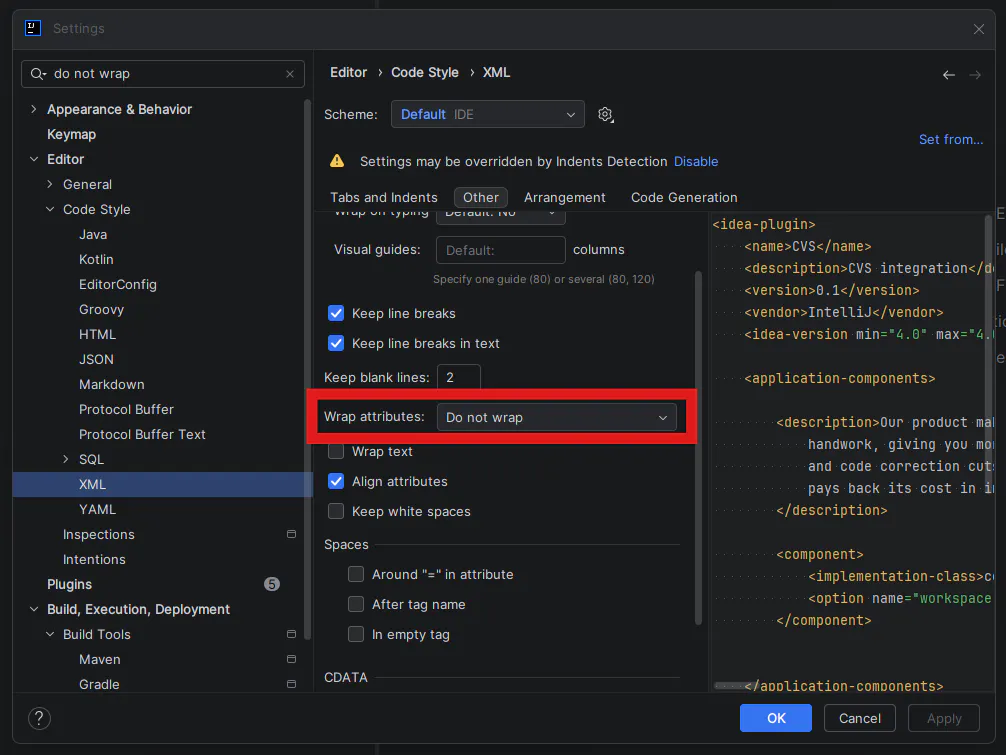
This prevents Intellij from automatically inserting line breaks in the exported XML configuration files.
This should resolve the issue 🙂
Best regards,
Anouar

