


Hello,
I have set up an Entra ID provisioning connector and configured all the required components including :
the application profile file,
the application file,
the connector,
the REST definition,
and the rights associated with provisioning.
However, when I assign a role, I encounter the following error:
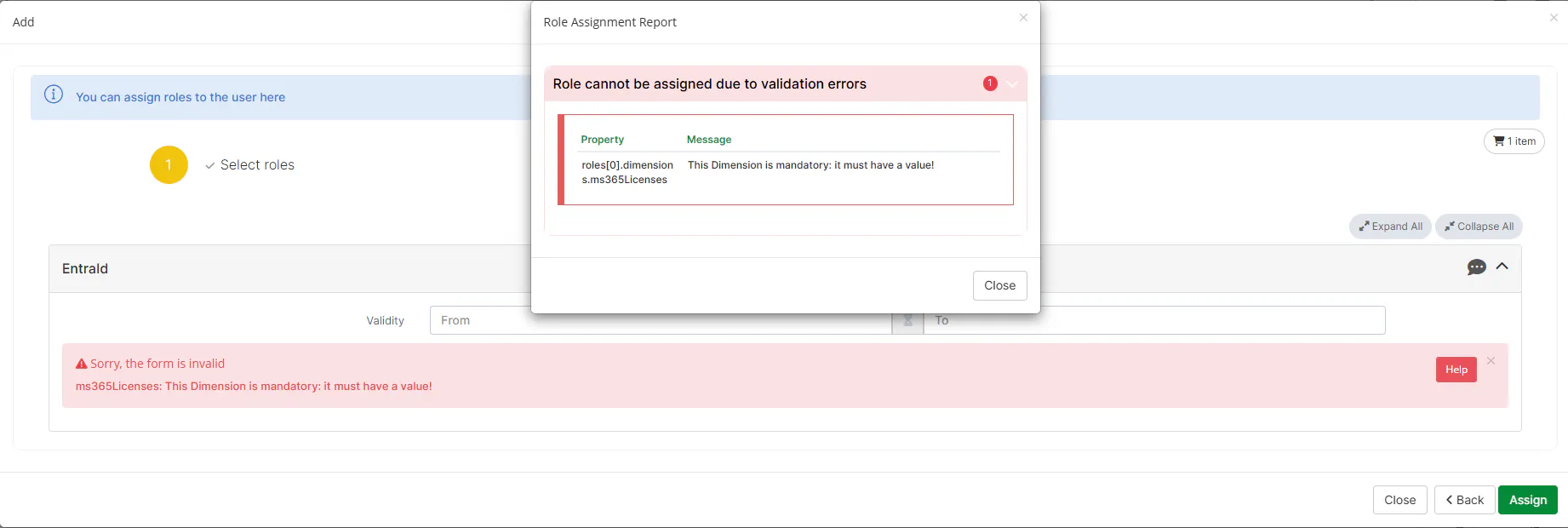
Do you have any idea what could be causing this issue and how to resolve it ?
Thank you
Hi there,
Since one of the rights you configured includes a mandatory dimension, this dimension must be valued in order for the role assignment to succeed. To do that, the dimension needs to be visible at the appropriate time, which is where the concept of tags comes into play.
Tags allow you to define when a dimension is displayed during the role lifecycle. Out of the box, Memority provides a preset tag called INIT. When this tag is associated with one or more dimensions, it makes those dimensions visible :
during the role request
and at all steps of the workflow
This is typically the recommended tag to use when a dimension is mandatory and must always be filled in.
In addition, you can define custom tags to control dimension visibility more precisely. For example, if you want a dimension to be visible only during role request, modification and removal but not during any workflow approval steps, you can :
associate a custom tag (ex : REQUEST) with the dimension
and reference this tag in the corresponding role request strategies within the relevant workflow strategies
Example of a tag set called REQUEST
<workflowStrategyForCreate xsi:type="ctdbum:ScriptRoleWorkflowStrategyType" xmlns:xsi="http://www.w3.org/2001/XMLSchema-instance">
  <readOnlyDimensionTags />
  <readWriteDimensionTags>
    <tag>INIT</tag>
    <tag>REQUEST</tag>
  </readWriteDimensionTags>
  <ruleDefinition>
    <script><![CDATA[
              return (ROLE_REQUEST.role.roleWorkflow) ?: null
              ]]></script>
  </ruleDefinition>
</workflowStrategyForCreate>
Similarly, if you want a dimension to be visible only at a specific workflow step (for example, step 2 of a given workflow), you need to:
go to the workflow configuration,
open the configuration of the relevant step,
update the roleRequestWidget of that step, and
reference a dedicated tag (ex: STEPTWO)
Example of a tag set called STEPTWO
<widget id="roleRequestWidget" xsi:type="ctdbum:RoleRequestWidgetType">
    <hidden>false</hidden>
    <config>
        <actions/>
        <commentMode>READ_WRITE</commentMode>
        <tagsForCreate>
            <readOnlyDimensionTags>
                <tag>INIT</tag>
                <tag>STEPTWO</tag>
            </readOnlyDimensionTags>
            <readWriteDimensionTags/>
        </tagsForCreate>
        <tagsForDelete>
            <readOnlyDimensionTags>
                <tag>INIT</tag>
                <tag>STEPTWO</tag>
            </readOnlyDimensionTags>
            <readWriteDimensionTags/>
        </tagsForDelete>
        <tagsForUpdate>
            <readOnlyDimensionTags>
                <tag>INIT</tag>
                <tag>STEPTWO</tag>
            </readOnlyDimensionTags>
            <readWriteDimensionTags/>
        </tagsForUpdate>
        <validityRangeMode>READ_WRITE</validityRangeMode>
    </config>
</widget>
To directly answer your issue, you simply need to add the INIT tag to the role configuration so that the mandatory dimension is displayed and can be valued. This will prevent the error you are encountering during role assignment.
This should address the issue 🙂
Best regards,
Anouar

